Stop managing tabs. Start managing commands.

A native macOS app that gives the long-running commands you -- and your AI agents -- depend on a permanent home. Start them, watch them, and stop them for real.
Works with Claude Code, Codex & Cursor
macOS 15+ • Free edition: 5 saved commands, 10 ad-hoc, 25K output lines.
Does this sound familiar?
Two ways to lose the process you were counting on.
Your agent the new way
- Spins up a dev server to test its change.
- Loses the handle, starts a second copy -- the port is already in use.
- Guesses
sleep 5 && curl. Too short. The test fails. - Reports "done" and walks off.
- The server is still running. The port is still held.
You the old way
- Open Terminal. Start the server, the database, the worker.
- Rename the tabs so you can tell them apart.
- Arrange the windows just right.
- Then Terminal crashes, or you close the wrong tab.
- Or your Mac restarts.
It's gone. Every. Single. Time.
Same root cause: nothing is keeping track.
This is what a guessed timer actually looks like
No registry, so no truthful answer to "is it running?". No real handle, so no clean way to stop it. The agent backgrounds a server, guesses how long it takes to boot, guesses wrong, then starts a second copy and collides on the port.
# start the server, then guess how long it takes
$ python app.py &
 * Starting...
# hope it is up by now
$ sleep 5 && curl http://127.0.0.1:5000
curl: (7) Failed to connect to 127.0.0.1 port 5000 after 0 ms: Couldn't connect to server
# still booting -- the guess was too short. start it again?
$ python app.py &
Address already in use
Port 5000 is in use by another program. Either identify and stop that program, or start the server with a different port.
# "task complete" -- two servers still running, port still held
Introducing Command Book
The front door for long-running processes
Anything you or your agent starts through Command Book -- from the GUI or the CLI -- lands in one runtime registry. So "is it running?" gets a true answer, and "stop it" gets a real handle.
Same reliability, whether a human is at the keyboard or an agent is driving.
# start it in the background — no &, nothing to orphan
$ commandbook start talk-python-dev
✓ Started Talk Python (dev) — pid 81234 (detached).
# one call, no guessed sleeps: block until the port answers, return the instant it does
$ commandbook wait talk-python-dev --http http://127.0.0.1:5000
● talk-python-dev — ready (http://127.0.0.1:5000) in 0.4s
# do the real work against the port, then read what it said
$ commandbook logs talk-python-dev --tail 2
10:02:07 127.0.0.1 - "GET /api/episodes HTTP/1.1" 200
10:02:09 127.0.0.1 - "GET /health HTTP/1.1" 200
$ commandbook stop talk-python-dev
Stopped Talk Python (dev) (pid 81234).
One loop. The agent never guesses about a process again.
Four commands, one dependable rhythm -- and one registry both of you read from.
run <slug> &
background the process
status <slug>
exit 0 == running
hit the port
run tests, scrape, build
stop <slug>
SIGINT → TERM → KILL
status --json
Same truth, two readers. That's the whole trick -- no magic.
Wire up your agent in about a minute
Install once. The agent learns the loop.
Claude Code
Settings → AI Agents → Install Claude Code Skill & Agent.
One click drops a skill into ~/.claude/skills/ask-commandbook/ plus an operator agent, and Claude knows the loop.
Codex & Cursor
A one-line instruction file pointing at https://commandbookapp.com/docs/ai-guide.md. That's it.
Any agent
There's an llms.txt and a hosted ai-guide.md, so agents can discover the rules on their own.
Two honest notes
Command Book only sees what Command Book launched.
status and stop won't find a process you (or the agent) started some
other way. The fix is to start it through the front door in the first place.
None of this is agent-only. The same registry that keeps an agent honest is what brings your own processes back after a restart. The reliability is the product, whoever's driving.
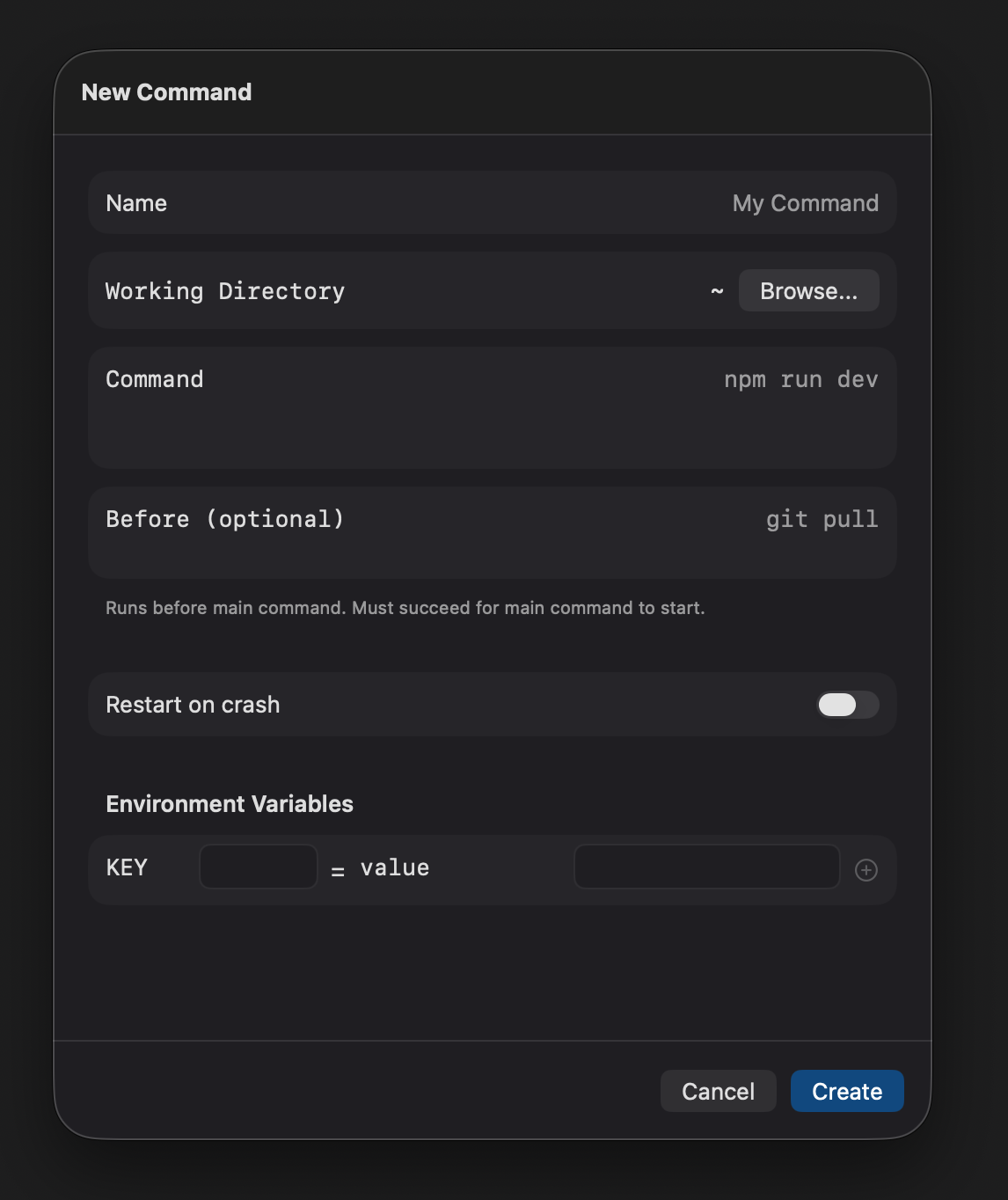
Save it once. Run it forever.
Capture the name, working directory, environment variables, and pre-commands like
git pull -- one time. Then it's a click or a slug away.
No more reconstructing that 20-flag invocation from memory. And every saved command is a slug your
agent can run too.
It's gone? No. It's right where you left it.
Quit Command Book or restart the Mac -- relaunch and your processes are right where you left them.
Sidebar order preserved. And what they printed is saved to disk, so
commandbook logs <slug> can still tell you how yesterday's run ended.
Turn on auto-restart and crashed processes come back on their own, with a countdown you can cancel. The "Every. Single. Time." you used to lose is now the thing you can count on.

Built to live in all day
The everyday craft that keeps it on your second monitor.
Keyboard-first palette
Press ⌘K to run, switch, and clear without touching the mouse. Arrow keys to navigate, Enter to run, Tab to edit.
Full color, massive buffers
24-bit true color output with up to 500,000 lines of history (25K free). Search with ⌘F -- plain text or regex.
One-click URLs
When your server prints a URL, Command Book lifts it above the output. Your running web app is always one click away.
Run commands from your terminal too
Command Book includes a full CLI. Run a saved command, start one in the background, read back what it printed, and list, create, or edit commands without leaving your terminal. The CLI and GUI share the same database -- commands created in one are instantly available in the other, and either side can stop what the other started.
Install from Settings → CLI Tools and you're ready to go.
run
start
logs
status
wait
stop
list
new
edit
open
$ commandbook list

SLUG               NAME                COMMAND
─────────────────────────────────────────────────────────
api-server         API Server          npm run dev
docker-postgres    Docker Postgres     docker compose up db
talk-python-dev    Talk Python (dev)   python app.py

$ commandbook run talk-python-dev

Talk Python (dev)
────────────────────
Command:   python app.py
Directory: ~/projects/talk-python
────────────────────

▶ Running: python app.py
 * Serving Flask app 'app'
 * Running on http://127.0.0.1:5000
Built for macOS
Native Swift and SwiftUI. No Electron, no web views. 21 MB on disk. 73 MB in memory. Notarized and signed.
Simple pricing
Start free -- the full run / status / stop agent loop is
included, not paywalled. Upgrade when you outgrow the limits.
Forever
- Full GUI interface
- Full CLI + AI agent loop (run · status · stop)
- Auto restart failing commands
- 5 saved commands
- 10 saved ad-hoc commands
- 25,000 lines of output capture
One-time purchase
- All free features, plus:
- Unlimited saved commands
- Unlimited ad-hoc commands
- 500,000 lines of output capture
- Group commands to organize
- Updates within major version
No subscription. No account required. Yours forever.
Have questions? Check our FAQ
Ready to stop juggling terminal tabs?
Give your processes -- and your agent -- a real home. Whether you or Claude Code starts it, it's tracked, reachable, and stoppable for real.